


Chevy Remote Start Before Cold Weather: Key Fob, App, and Climate Controls Explained
Chevy remote start can help warm the cabin before you get in, but the key fob, myChevrolet app, and climate settings each play a different role. The fob sends a nearby command, the app uses a connected service, and the vehicle’s equipment and settings determine how the cabin responds.
For a cold departure from Norwood Central, knowing those controls can help you prepare the cabin shortly before you leave. Remote start availability and operation vary by model, year, and equipment.
How to Remote Start a Chevy With the Key Fob
On an equipped Chevrolet, look for the looping-arrow remote-start button. The sequence depends on the vehicle:
- Double-press sequence: Press the remote-start button twice.
- Lock-then-hold sequence: Press Lock first, then press and hold the remote-start button until the vehicle starts.
Use the sequence in your Owner’s Manual and keep the vehicle locked. The turn signals flash to confirm a successful remote start.
After errands at University Station, the fob is a straightforward option when your vehicle is close enough to receive its signal. It does not rely on your phone’s internet connection.
Remote starting also differs from making the vehicle ready to drive. On vehicles with push-button start, bring the key fob inside, press the brake, and press the Start/Stop or Power button as directed in the manual.
How Remote Start Works in the myChevrolet App
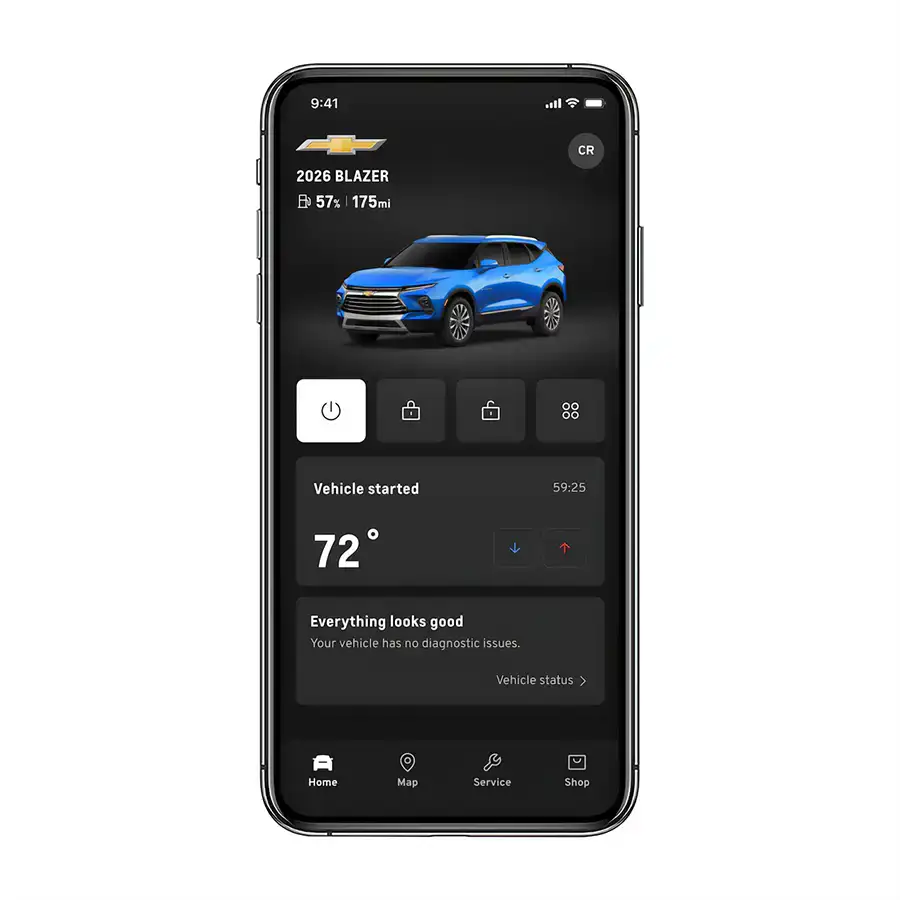
The myChevrolet app can send remote commands when your vehicle is properly equipped and your active service plan supports them. Your phone and vehicle both need a working connection. Downloading the app alone does not establish remote-start eligibility.
To get started:
- Sign in and select the correct vehicle on your account.
- Confirm that your vehicle is connected and your plan includes remote commands.
- Tap the Start or Climate control, depending on the vehicle.
- Check the command’s status to confirm the result.
On supported vehicles, tapping the control again cancels the command or turns the vehicle or climate system off. A Climate widget may also let you change cabin temperature when the vehicle supports that feature.
After practice at The Skating Club of Boston, an app command may reach your vehicle before you are within fob range, provided connectivity and service eligibility allow it. Send the command close to your departure.
Does Chevy Remote Start Turn On the Heat?
Remote start can operate the climate system and help warm the cabin on equipped Chevrolets. The behavior depends on your vehicle’s climate system and settings. Remote starting does not necessarily include temperature adjustment through the app.
On equipped automatic climate systems, choose a comfortable temperature and use AUTO to let the system manage fan speed and airflow. Systems that use the previous interior climate settings during remote start should be set appropriately before you switch the vehicle off.
Before a morning outing to Bird Park in Walpole, having those settings ready makes the departure simpler. Check your Owner’s Manual for the remote-start climate behavior and controls specific to your Chevrolet.
Check Heated-Seat Settings Separately
If your Chevrolet has heated seats, check its settings for automatic heated-seat operation during remote start. Using the seat heaters during a drive does not, by itself, confirm their remote-start behavior. Automatic seat settings can also change when you transition to normal vehicle operation.
For an early weekday trip along Nahatan Street, enable the applicable remote-start seat setting ahead of time, where supported. Check cabin heating and seat heating separately.
What to Check When Chevy Remote Start Does Not Work
A failed command does not automatically mean the remote-start system needs repair. Start with the conditions that can block it:
- Vehicle status: Confirm the vehicle is off, in Park, and the hood is closed. Turn off the hazard flashers.
- Key location: Remove the key fob from the vehicle.
- Fob operation: Check the battery and move closer if the signal is not reaching the vehicle.
- App access: Check the selected vehicle, plan, connection, and app updates.
- Remote-start limits: Check the manual for the permitted runtime and restart procedure.
For an app failure, tap your initials > Settings > Command History to review the error and recommended resolution. If the problem persists, tell our team whether it happens with the fob, the app, or both.
Keep Warm-Up Time Short in Massachusetts
Massachusetts prohibits unnecessary engine operation for more than five minutes while a vehicle is stopped. Specific exceptions apply, but a vehicle’s remote-start timer is not permission to idle for its full duration.
For a driveway departure around Dean Street, plan a brief start close to the time you leave. Park outdoors before remotely starting a gasoline or diesel engine; never run it in an enclosed garage. Clear snow and ice and confirm visibility before driving.
Get Help With Remote Start at Nucar Chevrolet of Norwood
Have your model year, key fob, and any app error message available when contacting Nucar Chevrolet of Norwood. We can help you understand the controls and discuss a service appointment if needed. Schedule Chevrolet service or explore our new Chevrolet inventory if remote start is on your next-vehicle checklist. Confirm the feature on the specific vehicle you are considering.
The Nucar Network expands your choices through shared inventory across our dealerships. Eligible new, non-lease purchases include the 20/200 Limited Protection Plan By Nucar, subject to restrictions and exclusions.
Our Happy Car Guarantee offers a return option on eligible purchases, with a $199 re-inspection fee and eligibility restrictions. See dealer for details.
Through Nucar Cares, we also support community initiatives. Help understanding your Chevrolet, broader shopping choices, and community involvement are all part of why Everyone Loves a Nucar!
20/200 Limited Protection Plan Disclaimer: Nucar Limited Protection Plan available on new vehicles only (lease, commercial use, police/fire/emergency, competitive driving/racing, multiple unrelated drivers & used vehicles excluded). New EV’s are excluded from this coverage. Customers must adhere to the manufacturer’s maintenance schedule and have the vehicle serviced at Nucar dealerships, if the customer lives within 50 miles of dealership. Non-transferable. See dealer for complete details.
0 comment(s) so far on Chevy Remote Start Before Cold Weather: Key Fob, App, and Climate Controls Explained